
TechDisc Physics Guide
TechDisc measures the disc at the release point and simulates a flight based on the measured release metrics. This guide is intended to help you understand what each metric means physically and how it can be used.
Launch, nose and hyzer
The release velocity describes the trajectory along which the disc's center is moving. Its orientation (nose angle & hyzer angle) describes which way the flight plate is tilted. A disc can be nose-down while moving upward. Alternatively an air-bounce is when a disc is traveling downward (negative launch angle) with a very positive nose angle.
launchAngle — Velocity elevation above horizontal, in degrees: positive travels upward, negative downward.
noseAngle — Front-to-back disc tilt relative to its direction of travel: positive is nose-up, negative nose-down. Also called Angle of Attack in most aerodynamics literature.
hyzerAngle — Side-to-side bank. Positive means hyzer and negative anhyzer in TechDisc's convention. The sign of hyzer angle is dependent on the spin direction. Preserve the supplied sign for spin and hyzer. Note: handedness does not affect the metrics and is only included to allow for friendly labelling of throws.
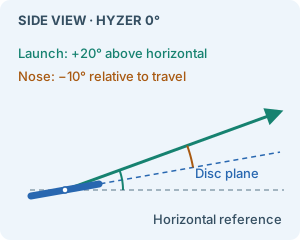
Unbanked side-view example: launch +20°, nose −10°
Speed, spin and wobble
Translation, axial rotation and off-axis motion have different units.
V2 requests use degrees for the three throw angles and wobble, radians for gamma, and radians/second for wx/wy. RPM magnitude converts to radians/second with 2π/60; the upstream adapter handles its own axis/sign convention.
speedMph — Release speed magnitude in miles/hour. To work in meters/second, multiply by 0.44704. This is separate from the disc's flight-number speed rating.
spinRpm — Signed axial rotation in revolutions/minute. Positive is clockwise looking at the top of the flight-plate; negative is counterclockwise. Preserve the sign for forehand, backhand and inverted releases.
wobble — Off-axis motion summarized as an angle in degrees, signifying the half-angle of the cone traced out by the axis normal to the disc's flight-plate as it wobbles through a rotation. Its magnitude alone does not specify the instantaneous phase or transverse angular-velocity components.
releaseState.gamma — In-plane release phase in radians, after the release heading, launch, instantaneous hyzer and nose have been removed. It locates the sensor axes relative to the release frame; it is not a compass heading.
releaseState.wx and releaseState.wy — Angular velocity about the sensor's in-plane X/Y axes, in radians/second. They are not world-axis velocities or derivatives of the displayed hyzer/nose angles.
Measured and artificial releases
Six display metrics do not uniquely specify a wobbling disc's initial state.
Real throws measured from a TechDisc include a releaseState, specifying the physical state of the disc at release. For a real measured throw, always pass its complete releaseState object unchanged when available. It contains releaseHyzerAngle, releaseNoseAngle, gamma, wx and wy from the same instantaneous release. Supply the throw’s speedMph, signed spinRpm and launchAngle alongside it. Both full and streaming simulation accept this object.
When
releaseStateis supplied, top-levelhyzerAngle,noseAngleandwobbleare ignored. When it is omitted, top-level hyzer and nose are required; optional wobble defaults to zero. Artificial throws are valid without measured release state.
An artificial throw assumes the supplied hyzer and nose are its instantaneous release orientation. The adapter sets gamma and wy to zero and derives wx from wobble and the magnitude of spin: wx = 2 × abs(spinRpm) × (2π / 60) × wobble × (π / 180).
A matched-flight comparison also needs the same disc parameters, release height and simulation settings. A preset's current flight numbers may differ from the numbers recorded with an older throw.
Coordinates, quaternions and time
Render the returned path at its own scale and timestamps.
For a Three.js scene with Y up and forward along −Z, map positions to [−west, up, −north] and transform orientations with the same basis. Keep physics in meters; multiply by 3.28084 only for feet labels.
Pause playback when it reaches the received buffer; resume without catching up for network waiting time. A complete event means transport finished, not that the last sample reached the ground. Simulations can end airborne at the 15-second horizon.
p and v — Positions are [north, west, up] in meters; generated velocities use the same axes in meters/second. North is the normalized forward axis, not necessarily geographic north. Stored v is null when unavailable, not a zero velocity.
qw, qx, qy and qz — Hamilton unit quaternions rotating disc-local axes into the NWU frame. Disc-local +Z is the flight-plate top. Returned quaternions already contain axial spin; do not add another gamma or RPM rotation. Three.js constructors take (x, y, z, w).
t — Seconds since release, with nonuniform spacing. Streamed chunks use absolute flight time and repeat their shared boundary sample. Deduplicate it; interpolate by timestamp rather than assuming a fixed sample rate.
Release height and downhill terrain
The simulator returns a flight until that flight hits the ground. Therefore the ground plane must extend below the whole playable flight.
maxVerticalDrop is the distance in meters from release to the simulator's zero ground plane. The default is 1 m; generated positions start at [0, 0, maxVerticalDrop]. It is not the flight's maximum altitude.
Stored flights, returned by GET /v2/flights/{throw_id}, are the flights the TechDisc app generated when the throw was recorded. Every stored flight uses a 1 m release height: its first sample is [0, 0, 1] and its ground plane is 1 m below the release. To reproduce the app's flight for a throw, send the throw's recorded flightNumbers and releaseState with maxVerticalDrop: 1. A stored flight cannot be re-rendered at another height; request a new simulation instead.
For a release H above the tee and a simulation plane D below the tee, request maxVerticalDrop = H + D. Render world height as teeElevation + returnedUp − D. Example: H = 1.5 m and D = 10 m means request 11.5 m and subtract 10 m from returned heights before placing them at the tee.
Disc parameters and flight shape
Separate the selected disc from the motion used to throw it.
flightNumbers.speed, glide and turn are disc-model ratings, not measured velocity, lift coefficients or angles. weight is mass in grams. The public construction contract accepts exactly these four fields, and all four are required:
| Field | Required | Range | Meaning |
|---|---|---|---|
speed |
yes | 0 to 14 | Speed rating |
glide |
yes | 1 to 6 | Glide rating |
turn |
yes | -4 to 3 | Turn rating |
weight |
yes | 135 to 180 | Mass in grams, not kilograms |
A request with a missing or out-of-range field returns 400 naming the field, for example weight must be a finite number or weight must be between 135 and 180. Any other field, such as fade, returns 400 Unsupported flight numbers field: fade. Throw and preset flightNumbers are stored values: a field is omitted when its stored value is missing or invalid, and present values are not range-checked, so check the four fields before sending a stored object to the simulator.
The same measured release can be simulated with a different selected disc. Speed, orientation and rotation together determine the resulting motion through the model; no single metric promises a particular distance or left/right finish.